


Solving Internet Dead Zones for Remote Work on Cross Country Trip?
For over two decades navigating the intricate world of travel, I've witnessed firsthand the digital nomad revolution transform how we work and live. Yet, with this freedom comes a significant challenge, one that can swiftly turn a dream road trip into a connectivity nightmare: the dreaded internet dead zone.
Picture this: you're cruising through breathtaking landscapes, the open road ahead, and suddenly, a critical client email comes in, or a deadline looms. You pull over, laptop open, only to be met with a frustrating 'No Service' message. This isn't just an inconvenience; it's a productivity killer, a source of immense stress, and for many remote workers, a non-negotiable roadblock to embracing the cross-country lifestyle.
But what if I told you that with the right strategies, gear, and mindset, you can navigate these digital deserts with confidence? In this definitive guide, I'll share expert insights, actionable frameworks, and battle-tested solutions to ensure your remote work remains uninterrupted, no matter how far off the beaten path your cross-country trip takes you. We are not just talking about survival; we are talking about thriving.
Understanding the Connectivity Conundrum on the Open Road
Before we dive into solutions for solving internet dead zones for remote work on cross country trip, it's crucial to understand the very nature of the beast. Mobile internet isn't a magical, ubiquitous force; it's a complex network of cellular towers, fiber optic lines, and satellite constellations, all with their own limitations and strengths.
The Reality of Cellular Coverage Gaps
Our smartphones and hotspots rely primarily on cellular networks. These networks, while extensive, are inherently limited by geography and infrastructure. Mountainous terrain, deep valleys, dense forests, and vast unpopulated areas often create 'shadows' where cell signals simply can't reach or penetrate effectively. Even major interstates can have surprising stretches of no service.
Expert Insight: Never assume continuous coverage, even with a top-tier carrier. Coverage maps are often optimistic and don't account for real-world signal degradation inside a moving vehicle or specific topographical challenges.
Factors like tower proximity, network congestion, and even weather can impact your signal strength. What might be a strong 5G signal in a city could quickly degrade to 3G, or vanish entirely, just a few miles down the road.

Strategic Pre-Trip Planning: Your First Line of Defense
The best offense is a good defense, and when it comes to internet connectivity on a cross-country trip, preparation is paramount. Don't wait until you're stranded to think about your signal.
Mapping Your Route for Signal Strength
This is where the real work begins. Before you even pack your first bag, get intimately familiar with your planned route's connectivity landscape.
- Research Carrier Coverage Maps: Check the official coverage maps for all major carriers (Verizon, AT&T, T-Mobile). Don't just look at your primary carrier. Cross-reference them to identify areas where multiple carriers have weak or no service.
- Utilize Third-Party Apps & Resources: Apps like OpenSignal, CellMapper, or even RV-specific forums often provide user-generated signal data that can be more accurate than official maps.
- Plan Alternative Routes & Stops: If a critical stretch of your journey is known for dead zones, identify alternative routes or plan to stop in towns with known good service for important calls or uploads.
Remember, the goal isn't to avoid every single dead zone—that's often impossible—but to anticipate them and have a strategy in place. This proactive approach is key to solving internet dead zones for remote work on cross country trip.
The Multi-Carrier SIM Approach
One of the most effective strategies I've personally employed is diversifying my cellular access. Relying on a single carrier, no matter how good, is a gamble on a cross-country trip.
Consider having active SIM cards from at least two, preferably three, different major carriers. You can swap these into an unlocked phone or a dedicated mobile hotspot as needed. While one carrier might have a dead zone, another might surprise you with a usable signal.
Pro Tip: Look into data-only SIMs or prepaid plans that offer large data buckets without long-term commitments. This allows you flexibility without breaking the bank.
The Essential Hardware Toolkit: Boosting Your Mobile Office
Once you've done your planning, it's time to equip your mobile office with the right gear. These tools aren't luxuries; they're necessities for reliable connectivity.
Powerful Cellular Boosters: Amplifying Weak Signals
A cellular booster is not a magic wand that creates a signal out of nothing, but it is incredibly effective at taking a very weak, unusable signal and amplifying it into something functional. It's often the difference between 'no service' and a slow, but usable, connection.
Boosters typically consist of an external antenna (to grab the weak signal), an amplifier (to strengthen it), and an internal antenna (to rebroadcast it inside your vehicle). Types range from cradle boosters for a single device to powerful in-vehicle or RV-specific systems with omnidirectional or directional antennas.
- Choosing the Right Booster: Research models like WeBoost or SureCall that are designed for vehicles or RVs. Consider your specific needs: do you need to boost signal for multiple devices, or just one? Do you need an omnidirectional antenna (easier setup, less gain) or a directional one (more powerful, requires aiming)?
- Proper Installation: For optimal performance, the external antenna needs to be mounted clear of obstructions, typically on the roof of your vehicle or RV. The internal antenna should be placed where you'll be working, ensuring sufficient separation from the external antenna to prevent oscillation. According to WeBoost, proper antenna separation is critical for a booster to function effectively.
Dedicated Mobile Hotspots: Beyond Phone Tethering
While tethering to your smartphone is convenient, dedicated mobile hotspots offer significant advantages for remote work, especially when solving internet dead zones for remote work on cross country trip.
Hotspots often have more powerful internal antennas than phones, better battery life, and, critically, many models include external antenna ports. This means you can connect a high-gain external antenna directly to the hotspot, dramatically improving its ability to pull in a signal, even without a booster.
| Feature | Pros | Cons | Best Use |
|---|---|---|---|
| Smartphone Tethering | Convenient, always with you | Drains phone battery, limited signal strength, no external antenna, can overheat | Brief, emergency use, light browsing |
| Dedicated Mobile Hotspot | Better internal antenna, external antenna port, dedicated battery, multiple device support, less prone to overheating | Extra device to charge, additional data plan cost | Primary remote work internet on the go, video calls, heavy data usage |
Investing in an unlocked hotspot gives you the flexibility to use SIM cards from different carriers, further enhancing your multi-carrier strategy.
Satellite Internet: The Ultimate Off-Grid Solution (Starlink & Others)
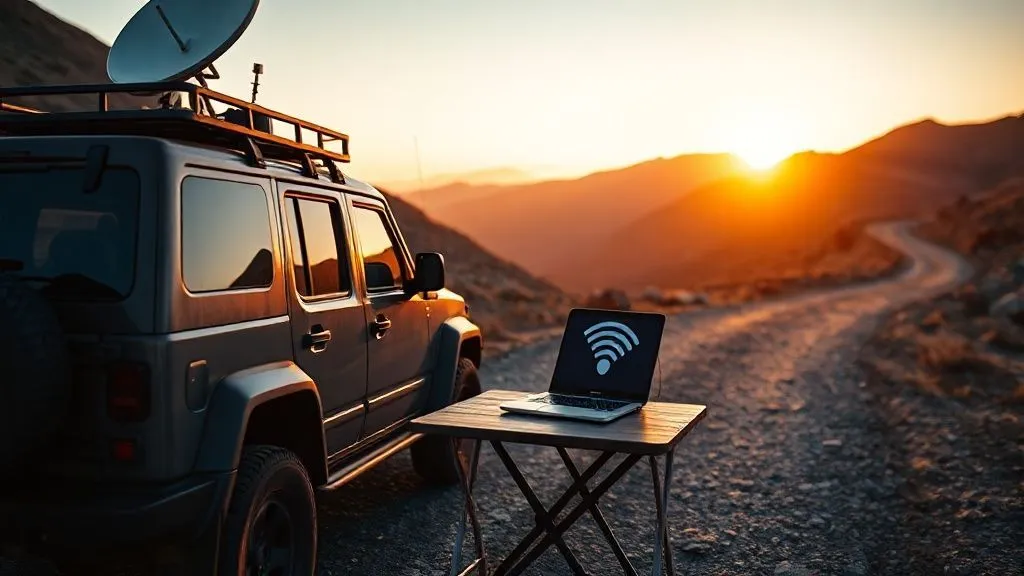
For truly remote work, where cellular signals are non-existent, satellite internet has emerged as a game-changer. Starlink, in particular, with its Low Earth Orbit (LEO) constellation, offers speeds and latency previously unimaginable for mobile satellite internet.
Starlink for RVs (now officially called Starlink Roam) provides high-speed, low-latency internet anywhere with an open view of the sky. While it requires a clear line of sight and isn't designed for use while driving (though some users report limited success), it's the ultimate solution for working from remote campgrounds, national parks, or desolate landscapes.
My Take: Starlink is a significant investment, but for those who genuinely need to work from anywhere, it's unparalleled. It transforms what was once a connectivity black hole into a productive workspace.
Other traditional satellite internet options exist, but they typically offer much slower speeds and higher latency, making them less suitable for real-time remote work tasks like video conferencing.
Software & Workflow Optimizations for Intermittent Connectivity
Hardware is only half the battle. Your workflow and software choices play a massive role in maintaining productivity when connectivity is unreliable.
Leveraging Offline Mode and Cloud Sync
Many modern productivity tools offer robust offline capabilities. Embrace them wholeheartedly.
- Pre-Download Everything: Before you leave a strong Wi-Fi zone, download all necessary documents, spreadsheets, presentations, and project files. Google Drive, Microsoft OneDrive, and Dropbox all allow you to make files available offline.
- Work Locally, Sync Later: Configure your applications (e.g., Google Docs, Microsoft Office 365, Notion, Obsidian) to save changes locally and then sync automatically whenever a connection is re-established. This allows you to continue working seamlessly even when offline.
- Email Clients: Set up your email client to download messages and attachments for offline viewing. Draft responses offline and send them when you have service.
This 'offline-first' mindset is a foundational strategy for solving internet dead zones for remote work on cross country trip. It shifts your dependency from constant connectivity to bursts of connectivity.
Optimizing Data Usage: The Bandwidth Diet
When you're relying on limited or expensive mobile data, every megabyte counts. Adopt habits that minimize your data footprint.
- Lower Video Quality: When streaming video (for entertainment or video calls), reduce the resolution. You don't need 4K for a casual meeting.
- Disable Background App Refresh: Prevent apps from consuming data in the background without your knowledge.
- Turn Off Automatic Updates: Schedule software and app updates for when you're connected to unlimited Wi-Fi.
- Use Data Compression Browsers: Some browsers or extensions can compress web pages to use less data.
- Avoid Large Downloads/Uploads: Plan large file transfers for when you have a strong, unlimited connection.
PCMag offers excellent advice on cutting down data consumption, which can be invaluable on the road.
The Human Element: Mindset and Backup Plans
No amount of gear or planning can completely eliminate every challenge. Your mental approach and readiness for contingencies are just as vital.
Embracing Flexibility and Patience
The open road is unpredictable. Weather changes, traffic snarls, unexpected detours, and yes, internet dead zones are all part of the adventure. A rigid expectation of constant, perfect connectivity will only lead to frustration.
A Veteran's Perspective: I've learned that the most successful digital nomads aren't those who never face problems, but those who adapt quickly. Embrace the spontaneity, allow for delays, and find creative solutions. Sometimes, the best solution is simply to take a break, enjoy the view, and try again in the next town.
Build buffer time into your schedule. If a task usually takes an hour, allocate two. This reduces pressure and allows you to calmly address connectivity issues without panicking.
Developing a Robust Redundancy Strategy
Your connectivity plan should always have layers of backup. Think of it like an onion: if the outer layer fails, you still have inner layers to rely on.
- Multiple Carriers: As discussed, having SIMs from different providers is crucial.
- Dedicated Hotspot + Phone Tethering: Even if you have a hotspot, your phone can be a last-resort backup.
- Local Wi-Fi Hotspots: Know where you can find public Wi-Fi (coffee shops, libraries, truck stops).
- Co-working Spaces: In larger towns, research available co-working spaces for guaranteed reliable internet.
Case Study: How Sarah Maintained Client Connectivity Across 10 States
Sarah, a freelance marketing consultant, embarked on a cross-country trip from California to Florida, needing to stay fully operational for her clients. Initially, she relied solely on her primary smartphone's hotspot. Within the first week, a critical video client call was dropped in a rural stretch of New Mexico, causing significant stress and a frantic search for signal. Learning quickly from this experience, she invested in a multi-carrier SIM setup (Verizon and AT&T) and a high-gain cellular booster for her RV. Crucially, she also adopted a strict offline-first workflow, downloading all necessary documents, video call links, and project files before hitting the road each morning. This proactive, multi-layered approach allowed her to conduct seamless video conferences from national parks and submit deliverables from remote campsites, proving that with the right preparation and adaptable mindset, internet dead zones can be navigated without professional disruption. Her clients never even knew she was working from the road.
Emergency Protocols and Local Solutions
Despite all your planning, there will be times when you simply cannot get a signal. Knowing your emergency options is critical.
Identifying and Utilizing Public Wi-Fi Hotspots
Public Wi-Fi can be a lifesaver in a pinch. Most towns, no matter how small, will have at least one location with free Wi-Fi.
- Coffee Shops & Restaurants: Starbucks, McDonald's, local cafes.
- Libraries: Often provide strong, free Wi-Fi, sometimes even after hours from their parking lots.
- Truck Stops & Travel Centers: Many offer paid or free Wi-Fi for travelers.
- Hotels: Even if you're not staying, some hotels have lobby Wi-Fi.
Always use a Virtual Private Network (VPN) when connecting to public Wi-Fi to protect your data and privacy. Never conduct sensitive transactions without one.
Pre-Emptive Communication with Clients and Teams
Transparency is key in remote work. If you anticipate being in a dead zone, communicate this proactively.
- Set Expectations: Let clients and colleagues know your travel plans and potential times of limited connectivity.
- Establish Check-in Times: Agree on specific times you'll be available or when you'll check for messages.
- Delegate or Automate: For critical tasks, see if you can delegate them or set up automated responses for periods you expect to be unreachable.
Harvard Business Review emphasizes clear communication as a cornerstone of effective remote work, especially when dealing with location-independent challenges.
Future-Proofing Your Mobile Office: Emerging Technologies
The landscape of mobile connectivity is constantly evolving. Staying aware of emerging technologies can help you prepare for future trips.
5G Rollout and Its Implications
The continued rollout of 5G networks promises faster speeds and lower latency, even in some rural areas. While 5G coverage is still concentrated in urban centers, its expansion will undoubtedly improve mobile internet reliability on major travel corridors.
Investing in 5G-compatible hotspots and cellular boosters now can future-proof your setup, allowing you to take advantage of these improvements as they become more widespread.
Low Earth Orbit (LEO) Satellite Constellations
Beyond Starlink, other companies are deploying or planning LEO satellite constellations. This increased competition and density of satellites will likely lead to more affordable, faster, and more widely available satellite internet options in the coming years, further empowering truly remote work from anywhere on Earth.
The convergence of advanced cellular networks and ubiquitous satellite internet will fundamentally change how we approach solving internet dead zones for remote work on cross country trip, making it an increasingly solvable problem.
| Technology | Current Impact | Future Outlook | Cost Range |
|---|---|---|---|
| Cellular Boosters | Enhances existing weak signals, extends usable range | Continues to be vital for fringe areas, will adapt to 5G frequencies | $150 - $600 |
| Dedicated Mobile Hotspots | More reliable than phone tethering, better antenna performance | Will fully leverage 5G, become more powerful and efficient | $100 - $400 (device only, plus data plan) |
| Starlink for RVs (Roam) | Game-changer for truly remote, off-grid work with high speeds | Broader availability, potentially lower cost, more mobile-friendly features | $599 (hardware) + $150/month |
| 5G Mobile Routers | Blazing speeds in urban/suburban 5G zones, better multi-device support | Wider coverage, more stable and pervasive connections, potentially replacing older hotspots | $200 - $800 (device only, plus data plan) |
Frequently Asked Questions (FAQ)
Can I really work from anywhere on a cross-country trip, even in national parks? With the right setup, yes, largely. While some deep canyons or extremely remote areas might still be challenging, a combination of cellular boosters, multiple carriers, and especially Starlink for RVs makes working from many national parks and truly off-grid locations entirely feasible. The key is strategic planning and investing in appropriate hardware.
Is a cellular booster worth the investment if I already have a good phone? Absolutely. Your phone's internal antenna is small and optimized for voice calls, not necessarily data in weak signal areas. A dedicated cellular booster, especially one with an external, high-gain antenna, can significantly outperform your phone's ability to pull in and amplify a weak signal, making the difference between no service and a usable connection for remote work.
What's the most critical piece of gear for reliable internet on the road? If I had to pick just one, it would be a high-quality, multi-carrier capable mobile hotspot with an external antenna port, combined with a powerful external antenna. This provides versatility and significantly boosts your chances of finding a usable signal across different networks. Starlink is a close second for true off-grid work, but the hotspot offers more flexibility for moving vehicles.
How much data should I plan for during a cross-country remote work trip? This varies greatly by your work. A good baseline for light remote work (emails, light browsing, occasional video calls) might be 50-100GB per month. For heavy video conferencing, large file transfers, or streaming, you could easily hit 200-500GB+. Always aim for an unlimited plan if possible, or at least a large data bucket, and implement data optimization strategies to conserve bandwidth.
Are public Wi-Fi networks safe for remote work? Public Wi-Fi can be convenient but carries security risks. Always assume your data could be intercepted. To mitigate this, use a reputable Virtual Private Network (VPN) for all your online activity on public networks. Avoid accessing sensitive financial or personal information without a VPN.
Key Takeaways and Final Thoughts
Navigating the connectivity challenges of a cross-country remote work trip might seem daunting, but it's an entirely solvable problem with the right approach. As a veteran in this space, I've seen how a blend of foresight, technology, and adaptability can turn potential dead zones into productive workspaces.
- Plan Proactively: Research routes, understand coverage maps, and diversify your carrier options before you leave.
- Invest in the Right Tools: Cellular boosters, dedicated mobile hotspots, and potentially satellite internet are your best friends.
- Optimize Your Workflow: Embrace offline capabilities and practice data-saving habits.
- Cultivate a Flexible Mindset: The road is unpredictable; patience and adaptability are paramount.
- Always Have a Backup: Redundancy in carriers, devices, and access points is non-negotiable.
The freedom of the open road doesn't have to come at the expense of your productivity. By implementing these expert strategies, you're not just solving internet dead zones for remote work on cross country trip; you're unlocking a new level of professional and personal freedom. Go forth, explore, and stay connected!
Recommended Reading
- Cozy Cabin Glamping: Your Ultimate Cold Weather Escape Guide
- 5 Crucial Steps: Selecting a Spa Retreat for Executive Burnout Recovery
- 7 Safe & Creative Ways to Capture Unique Railway Photography Shots
- 7 Proven Strategies: How to Secure Long-Term Funding for Community Tourism Projects?
- Best Age for Disney World with Toddlers: Maximize the Magic!


Your email address will not be published. Required fields are marked *