


How to guarantee quiet focus for remote work while couchsurfing?
For over 15 years in the budget travel and digital nomad scene, I’ve witnessed countless aspiring remote workers embark on incredible journeys, only to hit a wall when their professional demands clash with the very essence of their chosen accommodation: couchsurfing. It’s a beautiful concept – free lodging, cultural exchange, local immersion – but for those of us needing to deliver high-quality work, it often presents a unique, unspoken challenge.
The problem is stark: you’ve got deadlines, client calls, and deep work tasks, but your “office” is a host’s living room, potentially bustling with activity, or a shared bedroom where quiet hours are a foreign concept. The dream of productive travel can quickly devolve into a frustrating search for a silent corner, impacting both your work quality and your travel experience. It’s a delicate balance, and without a strategic approach, it’s easy to feel constantly behind or, worse, like an inconsiderate guest.
But fear not. From my extensive experience navigating these waters, I’ve developed a robust framework – a blend of pre-emptive planning, strategic communication, and clever hacks – that allows remote workers to not just survive, but truly thrive while couchsurfing. In this definitive guide, I’ll share actionable steps, real-world analogies, and expert insights to help you guarantee quiet focus, maintain professionalism, and still fully embrace the magic of budget travel.
The Unspoken Challenge: Remote Work Meets Couchsurfing
The inherent conflict between remote work and couchsurfing isn’t always obvious until you’re deep in it. Couchsurfing is built on spontaneous interaction, shared spaces, and the fluid rhythms of a host’s home. Remote work, especially deep work, demands focus, predictability, and often, silence. These two paradigms are fundamentally at odds, creating what I call the “digital nomad paradox” for those who choose this accommodation.
Unlike staying in a private Airbnb or a hostel with dedicated co-working spaces, a couchsurfing arrangement means you are a guest in someone’s personal sanctuary. This often comes with unspoken expectations of engagement, a lack of private space, and ambient noise that can range from a host’s TV to children playing, or simply the general sounds of daily life. For a remote worker, these aren’t minor inconveniences; they are direct threats to productivity and professional output.
“The biggest mistake a remote worker can make while couchsurfing is assuming their hosts inherently understand the demands of their job. Transparency and proactive planning are your greatest allies.”
I’ve seen countless travelers burn out trying to meet deadlines from a noisy living room, or feel guilty for needing to isolate themselves. The key is to acknowledge this challenge head-on and equip yourself with strategies that protect your work without compromising the spirit of hospitality. It’s about finding a respectful equilibrium.
Pre-Arrival Due Diligence: Screening Your Hosts for Work-Friendliness
The battle for quiet focus begins long before you even knock on your host’s door. Your choice of host is perhaps the single most critical factor in determining your success. In my experience, haphazardly picking a host based solely on location or reviews can lead to significant headaches down the line. You need to profile potential hosts with your remote work needs in mind.
Start by meticulously reviewing host profiles. Look for keywords like “quiet neighborhood,” “respectful,” “private room available,” or even “digital nomad friendly.” Pay attention to their lifestyle descriptions – do they mention late-night parties, a bustling family life, or are they more aligned with a calmer routine? A host who also works remotely, or has hosted many remote workers, is often a goldmine.
Crucially, don’t hesitate to ask direct, polite questions in your initial request. This isn’t being demanding; it’s being transparent and ensuring a good fit for both parties. Here are some essential questions to consider asking:
- “I work remotely and often need a few hours of quiet focus during the day. Is there typically a quiet space available, or times when the home is generally less active?”
- “What are the general rhythms of your household? Are mornings or afternoons typically quieter?”
- “How reliable is your internet connection, and is it suitable for video calls?”
- “Do you have a desk or a quiet corner where I might set up my laptop for a few hours?”
Their response will tell you everything you need to know. A hesitant or vague answer is often a red flag. A clear, accommodating response indicates a host who understands and is willing to help. This proactive approach saves you from awkward conversations and unproductive days later on. According to a Forbes Tech Council article on remote communication, setting expectations early is paramount for success.
| Criteria | Indicators of Work-Friendliness | Red Flags |
|---|---|---|
| Host Profile Keywords | 'Quiet', 'Respectful', 'Digital Nomad', 'Remote Worker', 'Own Desk' | 'Party Animal', 'Busy Household', 'Always Guests' |
| Host Lifestyle | Calm, predictable routine, works from home | Late nights, children, frequent visitors |
| Internet Reliability | High-speed, stable, mentions good signal | No mention, 'sometimes slow', uses mobile hotspot |
| Space Availability | Dedicated desk, quiet room, understanding of need for space | Only common areas, 'sleep anywhere', no mention of quiet |
Mastering Communication: Setting Expectations from Day One
Once you’ve found a promising host, the next critical step is reinforcing those expectations upon arrival and throughout your stay. I’ve learned that clear, transparent communication isn’t just polite; it’s your most powerful tool for securing the focus you need. Don’t assume your host remembers every detail of your pre-arrival messages.
During your initial conversation, perhaps over a welcome tea or coffee, gently reiterate your work schedule. Something like, “Just a heads-up, I’ll typically be working from around 9 AM to 5 PM. I’ll be needing some quiet time for calls and focused tasks, so I might be a bit absorbed during those hours. I’ll make sure to join in for dinner/activities afterwards!” This sets the tone without sounding demanding.
Offer reciprocal respect. Emphasize that you are also committed to being a great guest. “I’ll be mindful of your schedule and household routines,” or “Please let me know if there are any times I should be particularly quiet or if you have specific house rules.” This creates a mutual understanding and fosters goodwill, making it easier to address issues if they arise.
If distractions do occur, address them politely and constructively. Instead of “Could you turn the TV down? I’m working!” try “I apologize for interrupting, but I’m on a client call for the next hour. Would it be possible to lower the volume just for a bit? I’d really appreciate it.” This approach, rooted in empathy and respect, is far more likely to yield positive results and maintain a harmonious environment.
Strategic Space Hacking: Carving Out Your Productive Nook
Even with the most accommodating host, a dedicated office space is a luxury rarely afforded to couchsurfers. This is where your creativity and adaptability truly shine. I’ve become a master of “space hacking” – identifying and transforming even the most unlikely corners into temporary productivity zones. The goal is to create a psychological and physical boundary, however small.
Upon arrival, scan the environment for potential quiet zones. Is there a rarely used dining table? A corner of the living room away from the main traffic flow? A balcony or patio that offers fresh air and relative solitude? Even a quiet bedroom, if offered, can be optimized. The key is to find a spot that minimizes visual and auditory distractions and allows you to spread out your essentials.
Your setup doesn’t need to be elaborate. A sturdy surface, a comfortable (enough) chair, and good lighting are paramount. I always travel with a lightweight, portable laptop stand to improve ergonomics, and a small, foldable mat for floor-based work if a chair isn’t available. Remember, this isn’t about recreating your home office; it’s about creating a functional, temporary workstation.
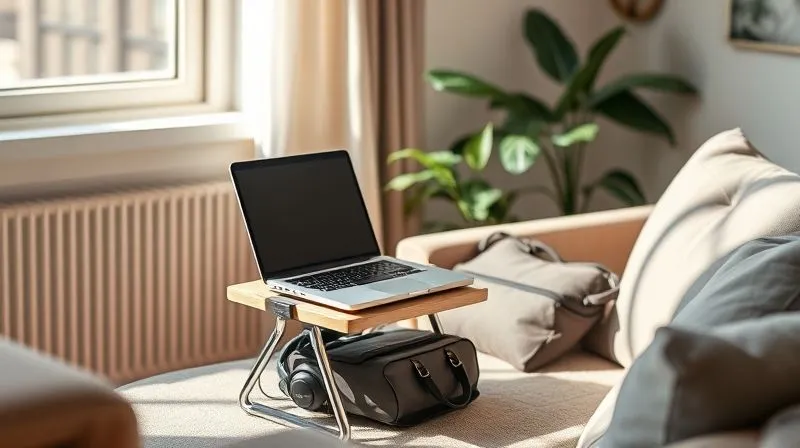
Consider the “power of the visual cue.” When your laptop is open, headphones are on, and you’re focused, it subtly signals to your host that you are in work mode. Most hosts are incredibly respectful once they understand your needs. Here are some portable office essentials I never travel without:
- Noise-Canceling Headphones: Absolutely non-negotiable for auditory focus.
- Portable Laptop Stand: Saves your neck and back, even on a small table.
- Power Bank & Universal Adapter: Keeps your devices charged no matter the outlet.
- Small, Foldable Bluetooth Keyboard/Mouse: For better ergonomics than a laptop trackpad.
- Eye Mask & Earplugs: Essential for sleep, but also for impromptu naps or hyper-focus.
Leveraging Technology: Your Digital Fortress Against Distraction
In the dynamic environment of couchsurfing, technology isn’t just a tool for work; it’s your personal fortress against external distractions. I’ve seen remote workers struggle immensely until they embrace these tech solutions, transforming their ability to maintain quiet focus. This isn't just about having a laptop; it's about curating a digital environment that supports deep work.
First and foremost, invest in a high-quality pair of noise-canceling headphones. This is not an optional accessory; it's an essential piece of your remote work toolkit. Whether it's the hum of city traffic, a host's conversation, or unexpected music, good headphones create a personal bubble of silence. Many models also include excellent microphones, crucial for clear video calls. I personally recommend over-ear models for superior noise isolation and comfort during long sessions.
Beyond hardware, leverage software to enhance your focus. Apps like the Pomodoro Technique timers (e.g., Focus Keeper, Forest) help you break down work into manageable, focused sprints with short breaks. Website blockers (e.g., Freedom, Cold Turkey) can temporarily restrict access to distracting sites, ensuring you stay on task. White noise or ambient sound generators (e.g., Noisli, Coffitivity) can mask unpredictable background noises, creating a consistent, soothing audio environment conducive to concentration.
Case Study: How Maya, a Freelance Developer, Found Focus in Berlin
Maya, a freelance web developer from Canada, found herself struggling during her couchsurfing stint in a lively Berlin apartment. Her host was friendly, but the shared living room was often busy, and the internet was inconsistent. Her deadlines were slipping, and her stress levels were rising. Implementing my advice, Maya invested in premium noise-canceling headphones and a reliable local SIM card with a generous data plan for a personal hotspot. She also started using the Pomodoro Technique strictly, communicating her focus blocks to her host. By creating her own 'digital fortress' and setting clear boundaries, she not only met her tight deadlines but also found more time to genuinely connect with her host, making her entire experience far more enjoyable and productive. This resulted in her being able to extend her trip and successfully deliver on multiple client projects.
Finally, ensure you have a reliable internet connection. While your host might offer Wi-Fi, it’s wise to have a backup. A local SIM card with sufficient data for tethering (using your phone as a hotspot) is a lifesaver when the host’s Wi-Fi is slow, unreliable, or non-existent in your chosen “quiet corner.” This redundancy guarantees you’re never truly disconnected from your work, a critical aspect of maintaining professionalism and meeting client expectations. For more on essential digital nomad tech, you can explore resources like Digital Nomad World's gear guides.
The Art of Scheduling: Syncing Your Flow with Host Rhythms
Successfully couchsurfing while remote working isn’t just about finding a quiet spot; it’s about intelligently integrating your work schedule with the natural rhythms of your host’s home. This requires a level of flexibility and observation that I’ve honed over years of adapting to diverse living situations. Blindly sticking to your 9-to-5 can be a recipe for friction and frustration.
Upon arrival, take a day or two to observe your host’s routine. Are they early risers who leave for work? Do they have a siesta in the afternoon? Are evenings typically social or quiet? Understanding these patterns allows you to strategically block out your most important work during the quietest periods. For instance, if your host leaves for work at 8 AM and doesn’t return until 6 PM, those morning and early afternoon hours are prime for deep work. If they’re a night owl, perhaps your most focused work can happen after they’ve gone to bed.
I often recommend what I call “morning sprints.” Waking up an hour or two before your host and tackling your most demanding tasks in the absolute silence of the early morning can be incredibly productive. Similarly, using the late evening hours, after social interactions have wound down, can be effective for wrapping up tasks or planning the next day. This minimizes conflict and maximizes your personal quiet time.
Communicate your intended work blocks to your host. “I’ll be focused on work from 9 AM to 1 PM today.” This simple statement creates a clear boundary and reduces the likelihood of interruptions. Remember, it’s not about being rigid; it’s about being strategic and respectful of both your needs and your host’s home. This mindful scheduling is a cornerstone of maintaining a healthy work-life balance on the road, as highlighted by various digital nomad communities.
| Time Block | Activity | Host Activity Level | Notes |
|---|---|---|---|
| 6:00 AM - 8:00 AM | Morning Sprint (Deep Work) | Low (typically sleeping/preparing) | Best for critical tasks requiring high focus. |
| 8:00 AM - 9:00 AM | Breakfast/Host Interaction | Medium | Connect, plan day, grab coffee. |
| 9:00 AM - 1:00 PM | Focused Work Block | Varies (often out/quieter) | Utilize headphones, leverage quietest space. |
| 1:00 PM - 2:00 PM | Lunch/Break | Medium | Step away from screen, explore locally. |
| 2:00 PM - 5:00 PM | Flexible Work/Admin | Medium-High | Less demanding tasks, calls if possible, consider external space if needed. |
| 5:00 PM onwards | Host Interaction/Exploration | High | Be present, enjoy cultural exchange. |
Beyond the Couch: When to Seek External Sanctuaries
Despite your best efforts in screening hosts, communicating, and space hacking, there will be times when the couchsurfing environment simply cannot provide the quiet focus you need. Recognizing these moments and having a backup plan is a sign of true remote work expertise. I’ve learned that sometimes, paying for a temporary workspace is an investment in your productivity, not an expense.
Don’t be afraid to venture beyond your host’s home. Co-working spaces are a digital nomad’s best friend. Many cities around the world now boast vibrant co-working communities offering day passes or flexible memberships. These spaces are purpose-built for productivity, with reliable internet, ergonomic chairs, and a professional atmosphere. A quick search on platforms like Coworker.com can help you find options in your current location. The cost, often equivalent to a few coffees, is a small price to pay for uninterrupted focus and professional amenities.
Libraries are another excellent, often free, option. They are inherently designed for quiet study and usually offer stable Wi-Fi. While not always glamorous, they provide a reliable sanctuary. Cafes can also work, especially during off-peak hours, but be prepared for background noise and the potential for unreliable internet. Always have your noise-canceling headphones ready for cafe work.

Public parks or botanical gardens can also serve as unexpected oases of calm, weather permitting. While not ideal for video calls, they can be perfect for creative tasks, writing, or catching up on emails that don’t require intense focus. Always ensure your devices are charged and you have a secure way to protect your equipment. The ability to shift your workspace is a powerful tool in a remote worker’s arsenal, ensuring that you can always find a productive environment, regardless of your immediate living situation. As a general rule, budgeting for a few paid workdays each week can significantly reduce stress and improve output.
Building a Resilient Remote Work Mindset on the Road
Beyond all the practical strategies, the most enduring asset for any remote worker couchsurfing is a resilient mindset. I’ve observed that those who thrive in this challenging environment aren’t necessarily the ones with the quietest hosts, but those who embrace flexibility, manage expectations, and cultivate mental fortitude. It’s about accepting that perfect conditions are rare and adapting gracefully.
Embrace flexibility as your superpower. The beauty of remote work is its adaptability, and couchsurfing amplifies this. There will be unexpected noise, last-minute changes, and moments when your ideal work setup is simply not possible. Instead of getting frustrated, see these as opportunities to practice problem-solving and adjust. Can you shift your work hours? Can you find a cafe for an hour? Can you tackle less demanding tasks during a noisy period?
Cultivate mindfulness and stress management techniques. The constant negotiation of space, noise, and social interaction can be draining. Simple breathing exercises, short meditation breaks, or a quick walk around the block can help clear your head and reset your focus. As Dr. Jon Kabat-Zinn, a pioneer in mindfulness, often emphasizes, being present and non-judgmental about your current situation can significantly reduce stress and enhance performance. Harvard Business Review also extensively covers the benefits of mindfulness in professional settings.

Finally, detach from the idea of perfection. Your remote work experience while couchsurfing won’t always be seamless, and that’s perfectly fine. Celebrate the small wins: the successful client call from a park bench, the completed project despite background chatter, the productive morning sprint. View challenges not as failures, but as part of the grand adventure. This resilient mindset transforms potential setbacks into valuable learning experiences, making you a more effective and adaptable remote worker in the long run.
Frequently Asked Questions (FAQ)
What if my host is genuinely loud and unresponsive to my needs, despite my polite communication? In such rare cases, you have a few options. First, consider if you can shift your work to external locations like co-working spaces or libraries for the majority of your stay. If that's not feasible and your productivity is severely impacted, it might be necessary to politely thank your host and seek alternative accommodation. Your professional responsibilities must take precedence, and sometimes a free stay isn't worth the cost to your career. Always prioritize your work and well-being.
How do I maintain professionalism if I’m working from a shared living room or a less-than-ideal setup? Maintaining professionalism is largely about managing perceptions and leveraging technology. Use a good quality webcam and microphone for calls, ensuring your background is as neat and neutral as possible (or use a virtual background). High-quality noise-canceling headphones are crucial. Always inform clients or colleagues if you anticipate any minor background noise. Your focus and quality of work speak louder than your immediate surroundings.
Are there specific types of Couchsurfing hosts more suitable for remote workers? Absolutely. Look for hosts who explicitly mention “quiet,” “digital nomad friendly,” or who themselves work from home. Hosts who are older, live alone, or have fewer social commitments often provide a calmer environment. Avoid hosts who mention frequent parties, young children, or a very active social household if quiet is your top priority. Always read reviews for mentions of tranquility or suitability for work.
What are the legal or ethical implications of expecting a quiet work environment as a guest? Ethically, as a guest, you’re expected to be flexible and respectful of your host’s home and lifestyle. You cannot demand silence. However, it’s also ethical to be transparent about your needs beforehand. The solution lies in respectful communication and mutual understanding, not demands. If a host cannot provide the environment you need, it’s better to find alternative accommodation rather than impose expectations that were not agreed upon. Couchsurfing is primarily about cultural exchange, not free office space.
How can I balance being a good guest with my work demands without feeling guilty? The key is proactive communication and clear boundaries. By discussing your work needs upfront and observing your host’s routine, you can schedule your work during less social times. Make a conscious effort to engage with your host during your breaks and after work hours. Offer to help with chores, share a meal, or simply chat. Showing genuine interest in their life and culture demonstrates you’re a good guest, which then makes your need for focused work time more understandable and acceptable.
Key Takeaways and Final Thoughts
Navigating remote work while couchsurfing is undeniably challenging, but as I’ve shown, it’s far from impossible. With the right blend of foresight, communication, and adaptability, you can absolutely guarantee quiet focus and maintain high productivity, all while enjoying the unique benefits of budget travel.
- Screen Your Hosts Diligently: Your host choice is paramount. Ask direct questions about their home environment and your work needs.
- Communicate Proactively: Set clear expectations about your work schedule and need for focus from day one, and politely reinforce them.
- Hack Your Space: Be creative in carving out a temporary, functional workspace, even in shared areas.
- Leverage Technology: Noise-canceling headphones, focus apps, and reliable internet are your non-negotiable allies.
- Strategize Your Schedule: Sync your work blocks with your host’s rhythms to maximize quiet periods.
- Utilize External Sanctuaries: Don’t hesitate to seek co-working spaces, libraries, or cafes when your host’s home isn’t suitable.
- Cultivate a Resilient Mindset: Embrace flexibility, manage expectations, and view challenges as part of the adventure.
Remember, the digital nomad lifestyle is about freedom and exploration, but it also demands responsibility and resourcefulness. By implementing these expert-backed strategies, you’ll not only safeguard your professional output but also enrich your travel experiences, proving that you can indeed have the best of both worlds. Go forth, explore, and work productively!
Recommended Reading
- The Ultimate Secret: How to Pack Snowboard Boots Efficiently for Travel
- Unlock Free Adventures: Your Ultimate Guide to Discovering Local Events on a Budget
- Reclaim Your Spirit: Solo Travel's 7-Step Escape from Corporate Burnout
- The Secret to Stress-Free Gourmet Cruises with Dietary Needs
- Unlock the Secrets: How to Plan the Perfect Après Ski Evening on a Budget





Your email address will not be published. Required fields are marked *