


Securing Client Privacy on Solo Road Trips: Urgent Protocols?
For nearly two decades, I've navigated the evolving landscape of travel, particularly the unique challenges and liberating freedom of solo road trips. What I've also witnessed, time and again, is a critical oversight among even the most seasoned remote professionals: the assumption that digital security protocols from their home office seamlessly translate to the open road. This isn't just a minor inconvenience; it's a gaping vulnerability that can lead to catastrophic consequences.
Imagine you're miles from civilization, perhaps pulling over to a quaint diner to send an urgent email, only to realize the free Wi-Fi is a data siphoning trap. Or worse, your physical documents, containing sensitive client information, are left unsecured in your vehicle during a quick stop. The stakes are incredibly high when client privacy is on the line. Breaches don't just cost money; they erode trust, damage reputations, and can lead to severe legal repercussions under stringent data protection laws.
This isn't about fear-mongering; it's about empowerment. In this definitive guide, I'll share the urgent, practical protocols and robust frameworks I've developed and refined over years of hands-on experience as a solo road warrior. We'll dive deep into securing your digital footprint, safeguarding physical assets, and establishing an impenetrable shield around your client's confidential data, ensuring peace of mind no matter where the road takes you.
Understanding the Unique Threat Landscape of Solo Road Trips
The Allure vs. The Vulnerability
The open road offers unparalleled freedom, inspiring countless professionals to embrace the digital nomad lifestyle. However, with that freedom comes a heightened, often unseen, security responsibility. Unlike a controlled office environment, a solo road trip introduces a dynamic set of variables that can compromise data security.
"The open road offers unparalleled freedom, but with that freedom comes a heightened, often unseen, security responsibility."
I've personally encountered situations where the temptation of convenience overshadowed security best practices. It's easy to let your guard down when you're surrounded by breathtaking scenery, but that's precisely when vulnerabilities emerge. Here are the core areas of concern:
- Public Wi-Fi Risks: Unencrypted networks in cafes, motels, or rest stops are fertile ground for data interception by malicious actors.
- Physical Security Challenges: Your vehicle isn't a vault; it's a highly visible target for theft. Laptops, tablets, and even document folders can be easily snatched.
- Remote Access & Device Vulnerabilities: Unsecured devices, whether a laptop, tablet, or smartphone, are gateways to your entire network and all stored client data.
- Human Error: Fatigue, distraction, and the sheer novelty of new environments can increase the likelihood of making security mistakes.
As a seasoned road warrior, I've learned that the romanticized image of working from a scenic overlook often glosses over the very real dangers. According to a Forbes Advisor report, data breaches are becoming more frequent and costly, with the average cost of a data breach reaching $4.45 million in 2023. Remote work, while flexible, exacerbates these risks if not managed proactively with rigorous protocols.

Pillar 1: Fortifying Your Digital Defenses on the Go
VPNs: Your Non-Negotiable Digital Cloak
The first and most critical step in securing client privacy on solo road trips is the ubiquitous use of a Virtual Private Network (VPN). Think of it as your personal, encrypted tunnel through the internet, shielding your data from prying eyes, especially when you're forced to connect to public Wi-Fi networks. A VPN encrypts your internet traffic, making it unreadable to anyone trying to intercept it.
I can't stress this enough: never connect to an unknown or public Wi-Fi network without first activating your VPN. It's a foundational layer of security that protects against passive eavesdropping and active man-in-the-middle attacks. It’s a small subscription fee for immense peace of mind.
- Choose a Reputable Provider: Not all VPNs are created equal. Opt for services with a strict no-logs policy, strong encryption standards (e.g., AES-256), and a proven track record (e.g., NordVPN, ExpressVPN, ProtonVPN). Avoid free VPNs, as they often monetize your data.
- Enable Always-On: Configure your devices (laptops, tablets, smartphones) to automatically connect to the VPN whenever they detect an internet connection. This prevents accidental unprotected browsing.
- Verify Connection: Always double-check that your VPN is active and connected before transmitting any sensitive client data, accessing confidential documents, or logging into secure platforms.
Secure Hotspots: Ditching Public Wi-Fi for Good
While VPNs are crucial, relying solely on public Wi-Fi, even with a VPN, introduces potential vulnerabilities. My go-to strategy for maximum security is to avoid public Wi-Fi entirely. Instead, I use a dedicated, secure mobile hotspot device or leverage my smartphone's hotspot with a strong, complex password.
This creates a personal, encrypted network that you control, minimizing exposure to compromised routers or rogue access points. It’s an investment, but the unparalleled security and consistent connectivity are priceless. Remember, even a strong VPN can't fully protect you from vulnerabilities within the public Wi-Fi router itself, which could be compromised or misconfigured, allowing some data leakage before encryption kicks in.
| Security Feature | Risk Level | Privacy Score | Cost |
|---|---|---|---|
| Public Wi-Fi (No VPN) | High | 1/5 | Free |
| Public Wi-Fi (With VPN) | Medium | 3/5 | VPN Subscription |
| Personal Hotspot (With VPN) | Low | 5/5 | Data Plan + VPN |
Pillar 2: Device Hardening and Data Management Protocols
Encrypt Everything: Devices and Drives
Imagine your laptop or an external drive containing sensitive client data is stolen. Without encryption, all that information is immediately accessible to anyone with basic technical knowledge. This is not just a breach; it's a catastrophic failure of your client privacy protocols. Full-disk encryption (like BitLocker for Windows or FileVault for macOS) is not optional for solo road warriors; it's absolutely mandatory.
Encryption renders your data unreadable without the correct decryption key, typically linked to your login password. This means even if your device falls into the wrong hands, the data remains protected. It’s a fundamental safeguard against unauthorized access.
- Activate Full-Disk Encryption: Ensure it's enabled on all laptops, tablets, and even high-capacity external drives that might store client data. Verify its status regularly.
- Strong Passwords/Passphrases: Combine full-disk encryption with robust, unique passwords or passphrases. Implement multi-factor authentication (MFA) on all accounts, especially those accessing client data, for an added layer of security.
- Regular Backups to Secure Cloud: Use encrypted cloud storage services (e.g., Sync.com, Tresorit, or enterprise-grade solutions) for continuous, automated backups. This ensures that even if a device is lost or damaged, your data is recoverable and remains secure.
Ephemeral Data & Zero-Trust Principles
When I'm on the road, I adopt a "zero-trust" mentality. This means I assume no device, user, or network is trustworthy until verified. It also means minimizing the amount of sensitive data I carry with me at any given time. This approach significantly reduces your attack surface.
"Only carry the data you absolutely need, for the time you absolutely need it. Delete or securely transfer the rest."
This principle extends to how you handle documents. Utilize secure file sharing services for client documents (e.g., ShareFile, Box, or client portals) rather than storing them locally on your device, unless strictly necessary for offline work. Wipe devices of sensitive data immediately after a project concludes or when the data is no longer required. For temporary files, use secure deletion tools that overwrite data multiple times, preventing recovery.
Pillar 3: Physical Security Measures for the Road Warrior
Vehicle Security: Beyond Locking the Doors
Your car is your mobile office, but it's also a highly visible target for opportunistic thieves. Leaving laptops, tablets, or even document folders in plain sight is an open invitation for theft, and I've seen this mistake countless times, leading to devastating data breaches and significant downtime. It’s not just about losing equipment; it’s about compromising client trust and facing potential legal liabilities.
Consider your vehicle a temporary storage unit, not a permanent safe. Every time you step away, you must assume someone is watching. Proactive physical security is just as important as digital encryption.
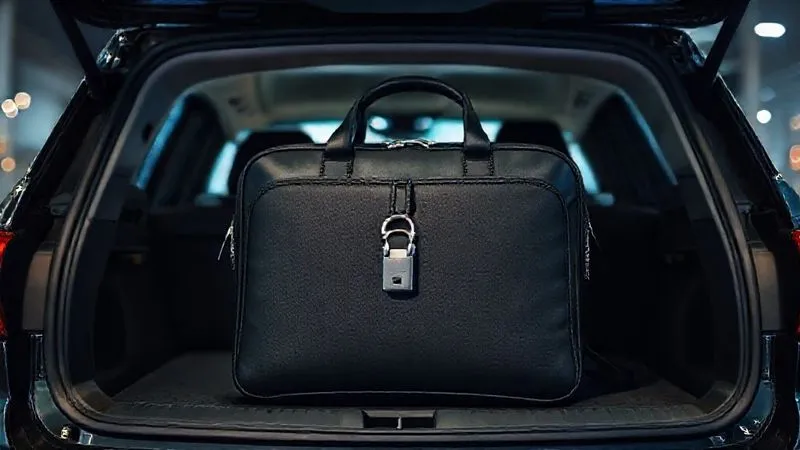
- "Out of Sight, Out of Mind": Always store electronics and sensitive documents in the trunk, a locked glove compartment, or an opaque, secure container when leaving your vehicle, even for a quick stop. Never leave charging cables or device imprints on seats, as these are tell-tale signs of hidden valuables.
- GPS Trackers: For high-value assets like laptops or crucial document bags, consider discreet GPS trackers. In the event of theft, these can aid in recovery and provide crucial information to law enforcement.
- Parking Prudence: Choose well-lit, secure parking areas, especially overnight. Utilize hotel parking garages with surveillance or park in visible, high-traffic areas during the day. Avoid parking in isolated spots.
Accommodation & Workspace Awareness
Hotels, motels, Airbnbs, and even co-working spaces present their own set of physical security challenges. Housekeeping staff, maintenance workers, or even other guests could potentially access your belongings if they are left unsecured. Your room isn't an extension of your home office in terms of security.
Always use the hotel safe for small, highly sensitive items like external hard drives or physical documents. Never leave your devices unattended, even for a moment, in public areas like hotel lobbies, cafes, or co-working spaces. When in your room, keep your door double-locked, use the deadbolt, and strategically place a "Do Not Disturb" sign on the door, even if you're inside working, to deter unexpected visits.
Pillar 4: Emergency Protocols and Incident Response
The "What If?" Scenario: A Pre-Emptive Strike
Despite all precautions, incidents can happen. A device can be lost, stolen, or compromised. Having a clear, rehearsed emergency protocol is paramount for mitigating damage, minimizing downtime, and maintaining client trust. This is where your authority as a professional truly shines; demonstrating preparedness even in crisis scenarios.
Case Study: How Nomad Consultant Averted a Crisis
Sarah, a solo marketing consultant, was on a cross-country road trip when her car was broken into at a roadside diner, and her laptop was stolen from the trunk. Because she had full-disk encryption enabled, remote wipe capabilities activated on her device, and a pre-defined incident response plan, she was able to immediately remotely wipe the device from her smartphone. Within hours, she notified her clients (using a pre-drafted, transparent message) that an incident occurred but assured them their data remained secure due to her robust protocols. This proactive approach not only protected her clients' sensitive data but significantly bolstered their trust in her professionalism and preparedness, turning a potential disaster into a testament to her reliability.
Your incident response plan doesn't need to be overly complex, but it must be actionable and accessible.
- Remote Wipe & Lock: Ensure all devices that store client data are configured for remote wiping and locking. Test these features periodically to confirm they work. This is your first line of defense in a theft scenario.
- Incident Response Plan (IRP): Have a clear, step-by-step plan for what to do if a device is lost, stolen, or a data breach is suspected. This should include who to contact (IT support, legal, clients), what steps to take, and necessary documentation.
- Client Notification Template: Prepare a template for transparently informing clients of a potential incident. This message should emphasize the steps taken to secure their data and reassure them of your commitment to their privacy. Honesty, combined with a clear action plan, builds confidence.
- Legal Counsel Contact: Know who to call for legal advice regarding data breaches, compliance requirements (e.g., GDPR, CCPA), and potential reporting obligations. Different regions have different mandates.
Regular Security Audits: Stay Ahead of the Curve
The digital threat landscape is constantly evolving. What was considered secure last year might be vulnerable today. I make it a point to conduct a personal security audit at least quarterly, especially before and after major solo road trips. This continuous vigilance is non-negotiable for maintaining robust client privacy.
This audit includes updating all software and operating systems, reviewing privacy settings on all apps, changing critical passwords, and researching new security threats relevant to mobile work. As cybersecurity expert Bruce Schneier famously said, "Security is a process, not a product." It requires continuous vigilance, adaptation, and proactive measures, not just a one-time setup.
Pillar 5: Navigating Legal and Ethical Compliance
Understanding Data Privacy Regulations
For professionals handling client data, understanding and adhering to various data privacy regulations is not merely a best practice; it's a legal obligation. Whether you're dealing with GDPR (Europe), CCPA (California), HIPAA (healthcare data in the US), or other region-specific regulations, ignorance is no defense against hefty fines, reputational damage, and potential lawsuits. The urgency of securing client privacy on solo road trips is amplified by these legal frameworks.
Your mobility adds complexity, as data processing might occur across different jurisdictions. I always recommend consulting with a legal professional specializing in data privacy to ensure full compliance, especially if you handle highly sensitive data or work with clients across different countries.
- Jurisdictional Awareness: Be acutely aware of the data residency and privacy laws of the regions your clients are in, and crucially, where you are physically traveling and accessing that data. Data transfer rules can be particularly complex.
- Data Minimization: Adopt a strict principle of data minimization. Collect and process only the data absolutely necessary for your services. The less data you have, the less risk there is in case of a breach.
- Consent and Transparency: Ensure clients are fully aware of how their data is handled, stored, and processed, especially in a mobile work context. Obtain explicit consent where required and maintain clear privacy policies.
Organizations like the International Association of Privacy Professionals (IAPP) offer invaluable resources, certifications, and up-to-date information on global privacy laws. Staying informed through such reputable bodies is crucial for any professional handling sensitive client information.
Pillar 6: The Human Element: Training and Awareness
Your Brain is Your Best Firewall
Ultimately, the strongest technical safeguards and the most rigorous protocols can be undermined by human error. Phishing attempts, social engineering, and simply letting your guard down are constant threats that target the weakest link in any security chain: the individual. As someone who has spent years on the road, I can attest that fatigue, distraction, and the novelty of new environments can easily lead to lapses in judgment.
Your personal vigilance and critical thinking are the ultimate defenses against sophisticated attacks. Cybercriminals often exploit trust and urgency, so a healthy dose of skepticism is your best friend when you're mobile and potentially more vulnerable to distraction.
Take regular breaks, stay alert, and be inherently suspicious of unsolicited communications, especially those that create a sense of urgency or offer something too good to be true. If something feels off – an email from an unexpected sender, a link that looks slightly wrong, a request for unusual information – it probably is. Never click on suspicious links, always verify sender identities through alternative, trusted channels (e.g., a phone call), and be wary of anyone asking for sensitive information over unverified channels.
Frequently Asked Questions (FAQ)
Q: Is it safe to use my personal phone as a hotspot for client work? A: Generally, yes, provided your phone's connection is secure (4G/5G) and you use a strong, unique password for your hotspot. Always combine this with a reputable VPN for an added layer of encryption. While it's a significant improvement over public Wi-Fi, be mindful of your data plan limits and battery life. Avoid letting your phone automatically connect to public Wi-Fi networks as a fallback, as this could inadvertently expose your data.
Q: How do I handle physical documents with client data while traveling? A: The absolute best practice is to digitize everything securely and avoid carrying physical documents whenever possible. If you must carry them, keep them in a locked, fireproof, and opaque bag, stored out of sight in your vehicle's trunk or in a hotel safe. Never leave them unattended in public spaces, even for a moment. Once their purpose is served, securely shred or return them to a secure, permanent location.
Q: What if I lose my internet connection in a remote area and need to access client data? A: This highlights the importance of offline access protocols and careful planning. Only store absolutely essential, encrypted client data locally on your device for offline access. For anything else, you should have a contingency plan, such as a backup satellite internet device for critical emergencies, or ensuring you complete tasks requiring sensitive data transmission only when a secure, reliable connection is guaranteed. Prioritize tasks that don't require immediate sensitive data access for remote zones.
Q: Are cloud storage services truly secure for client data when I'm mobile? A: They can be, but you need to choose wisely and configure them correctly. Opt for cloud providers that offer end-to-end encryption, zero-knowledge architecture (meaning even they can't access your data), and robust access controls (MFA, IP whitelisting, granular permissions). Services like Sync.com or Tresorit are designed with high security in mind. Never rely on basic consumer-grade cloud storage without thoroughly verifying their security protocols, especially for highly sensitive client information.
Q: Should I inform clients that I'm working remotely on a solo road trip? A: Transparency builds trust, but discretion is also key. While you don't need to share your exact itinerary, it's professional to assure clients that despite your mobility, their data security remains your top priority and that you have robust protocols in place. A simple, reassuring statement like, "Rest assured, my remote setup adheres to the highest security standards to protect your confidential information, ensuring seamless and secure service delivery," can go a long way in maintaining confidence.
Key Takeaways and Final Thoughts
The allure of the solo road trip, especially for the independent professional, is undeniable. It offers unmatched freedom, flexibility, and inspiration. But with that freedom comes a profound and urgent responsibility to safeguard client privacy. My journey through countless miles and diverse work environments has taught me that proactive, robust security isn't a luxury; it's a fundamental pillar of trust, professionalism, and sustainable business practice.
By integrating these urgent protocols into your solo road trip routine, you're not just protecting data; you're reinforcing your professional integrity and building an unshakeable foundation of trust with your clients. Approach every mile and every connection with a security-first mindset, and you'll not only navigate the road safely but also elevate your professional standing.
- Prioritize Digital Fortification: VPNs, secure personal hotspots, and full-disk encryption are non-negotiable foundational elements.
- Implement Strict Data Hygiene: Minimize data stored on devices, utilize secure cloud backups, and embrace zero-trust principles for all access.
- Master Physical Security: Your vehicle and accommodation require strategic safeguarding of all assets, both digital and physical.
- Prepare for the Unexpected: Develop and regularly rehearse an incident response plan for data breaches or device loss.
- Stay Informed & Compliant: Continuously update your knowledge of privacy regulations and emerging security threats to stay ahead.
- Empower the Human Element: Your personal vigilance, awareness, and critical thinking are the ultimate defense against social engineering and human error.
The open road awaits, and with these safeguards in place, you can conquer it with confidence, peace of mind, and the unwavering trust of your clients.
Recommended Reading
- 7 Critical Steps for Self-Rescue on Remote Big Wall Climbs
- Unlock Your Wanderlust: How to Overcome Fear of Solo Exploration Abroad
- Sled Dog Sick Mid-Expedition? 7 Critical Steps for Mushers
- The Ultimate Guide: How to Ensure Authentic Farm-to-Table Dining Experiences
- 7 Essential Strategies: How to Mitigate DCS Risks on Multi-Day Dive Trips




Your email address will not be published. Required fields are marked *